Sprunki Phase 6 is a character-based music mixer with a stark red-and-black presentation. You build a lineup by dragging icons from the lower tray onto the figures above it. The figures change appearance as their parts are assigned, so the stage becomes a visual record of the choices you make. Its horror artwork is prominent from the beginning, making the presentation worth considering before you start.
This introduction focuses on one browser build of Sprunki Phase 6. Numbered Sprunki titles can appear in different forms, so a phase name alone does not tell you everything about the artwork, controls, or available features. The details below describe the stage and basic interaction shown in the accompanying screenshot, without assuming that every upload bearing the same number is identical.
What Stands Out in Sprunki Phase 6?
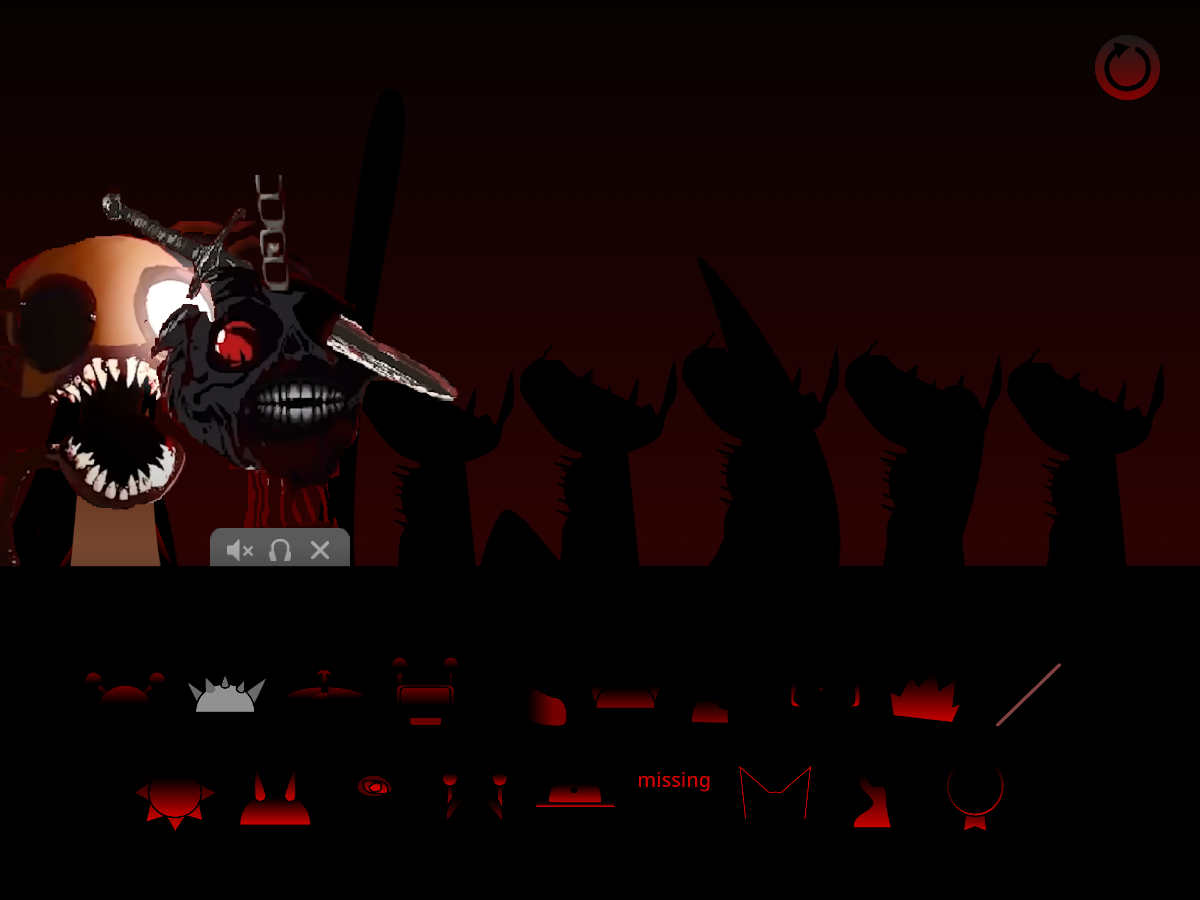
The red backdrop and black silhouettes give Sprunki Phase 6 a different immediate impression from the featured Phase 7 game. Before you assign a sound, the figures can blend into the dark stage. Adding an icon reveals a more detailed performer, making the change between an empty position and an active character especially visible. The contrast is part of the experience, rather than a reason to assume the game has failed to draw its characters.
Sprunki Phase 6 places its icon tray beneath the performers. The shapes include small character-like symbols and other recognizable forms, so you can choose by appearance while learning the lineup. There are two rows of tray positions in this build. Start with the icons you can identify clearly instead of treating every unfamiliar symbol as something you must unlock.
One Sprunki Phase 6 tray position is visibly labeled “missing.” That label does not establish a secret challenge or an unlock requirement. It is a detail of this particular build, and there is no basis here for promising a hidden character behind it. Knowing that distinction helps you avoid spending a session trying to solve a feature the interface does not explain.
How Does Sprunki Phase 6 Work?
Sprunki Phase 6 gives you seven stage positions for building an arrangement. The basic action is to pick an icon, move it onto a figure, and release it. A successful placement changes the figure into its associated performer. The tray also changes its visual state, helping you keep track of which parts you have already assigned.
To begin Sprunki Phase 6, try one icon on the leftmost figure, then another on the next figure. This small lineup makes the response easy to follow. You do not need to fill all seven positions to understand the interaction. It is more useful to recognize a successful placement before trying a large combination whose individual parts are harder to track.
The available Sprunki Phase 6 interaction is about choosing and arranging parts. The main stage does not display a target score, a race timer, or a sequence of numbered levels. That makes a short exploratory session a reasonable starting point: try a few performers, inspect the result, and decide which position you want to change next.
Sprunki Phase 6 Mouse Controls
For Sprunki Phase 6, hold the left mouse button over an icon, drag it into the stage area, and release over a figure’s body. Placing it over the body gives you a clearer target than aiming at an irregular head shape. Watch for the changed performer rather than assuming a click on the tray has already added a sound.
Sprunki Phase 6 displays a small control strip near an active performer. The visible symbols include a speaker, headphones, and a cross. These controls belong to the performer area, so move the pointer there when you want to inspect them. They are separate from any controls supplied by the website around the game.
The circular control at the top right of Sprunki Phase 6 is another useful landmark. Keep track of it while exploring, but do not confuse restarting or refreshing with saving an arrangement. Persistent saving and exporting have not been established for this build. If you want to remember a lineup, note the icons and their positions before leaving it.
A First Session with Sprunki Phase 6
Start your Sprunki Phase 6 session with a comfortable device volume and a simple lineup. Choose two distinct icons and assign them to neighboring figures. Let the visual response settle before adding more. This gives you a repeatable starting point, rather than a full stage that changes too quickly to inspect.
When revisiting Sprunki Phase 6, repeat the same opening choices and then change one part. Keeping most of the lineup stable makes a new decision easier to understand. This is an exploration method, not a guaranteed scoring trick or a secret combination. The purpose is to become familiar with the choices the interface actually offers.
Is Sprunki Phase 6 Right for You?
Sprunki Phase 6 is worth considering if you enjoy character-based mixing and are comfortable with disturbing cartoon artwork. The active performers have exaggerated, unsettling designs, and the restrained red-and-black background keeps attention on them. It is sensible to inspect the screenshot before deciding whether that visual style suits your session.
Treat Sprunki Phase 6 as a particular game to explore, rather than proof of a fixed story order across the whole series. A numbered label does not by itself establish difficulty, release chronology, or what another creator’s version contains. For a familiar starting point on this site, you can also play Sprunki Phase 7 and compare its stage with the one introduced here.
Ready to try this build? Play Sprunki Phase 6 on its dedicated game page.