What Is Sprunki Phase 6?
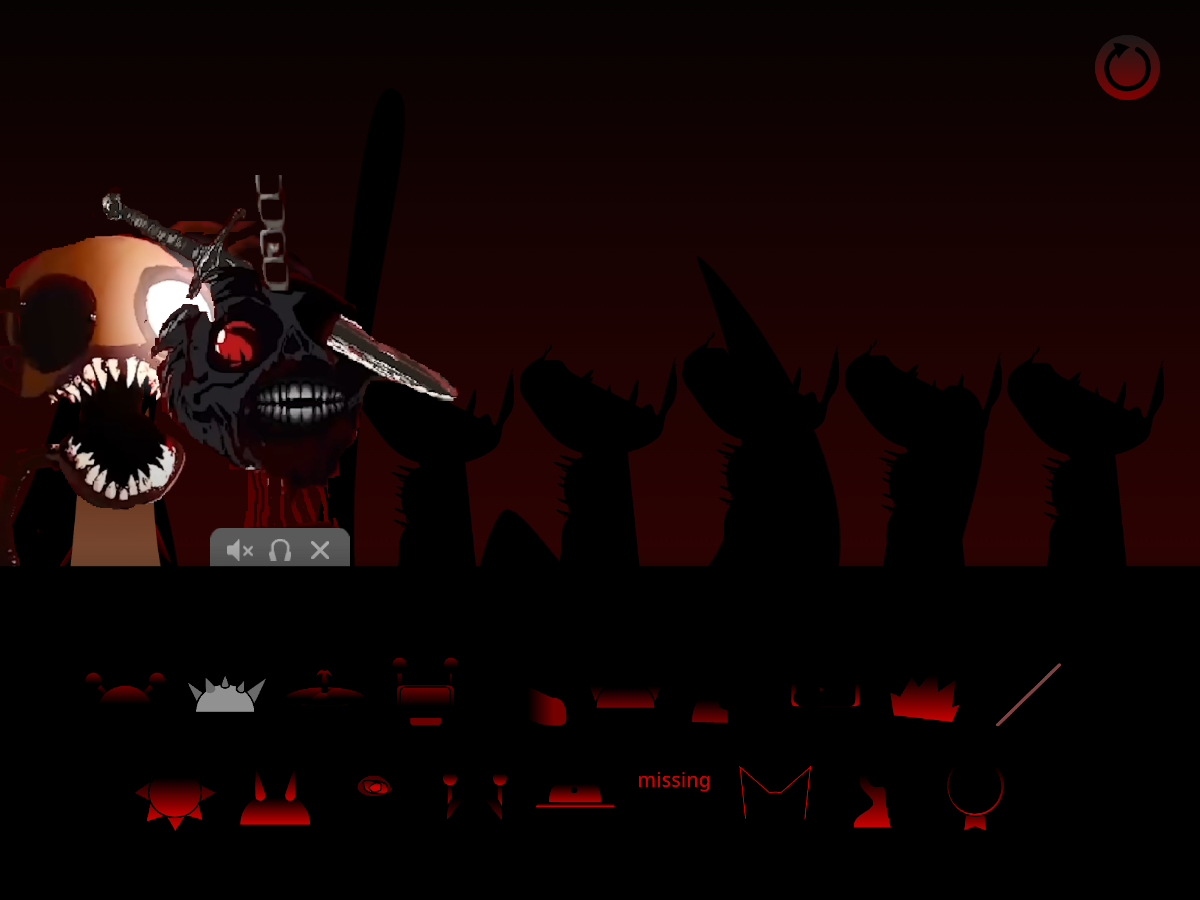
Sprunki Phase 6 is a browser music mixer with a red-and-black stage and horror character artwork. The central activity is arranging performers: choose an icon from the lower tray, drag it onto a waiting figure, and release it. The figure changes into the associated character. Your choices build the arrangement directly on the stage, rather than through a separate track editor or a written sequence of notes.
This page uses the unsuffixed Sprunki Phase 6 build distributed by Miniplay. Numbered fan projects can have several uploads and revisions. The screenshot, player, and instructions here refer to that selected build. A tutorial for a Definitive or Remastered edition may describe a different interface, even when its title includes the same phase number. Use the visible controls in this player when comparing instructions.
How to Start Sprunki Phase 6
Select Play Sprunki Phase 6 above to load the game in the same space as its cover. The website waits for your click before creating the game frame. Allow the embedded player to finish preparing its artwork and sounds. If your browser presents an internal start control, follow the prompt in the player. The stage and tray are the place to begin once the game has opened.
The opening stage has seven positions, with black figures against a red backdrop. These silhouettes are part of the presentation. They are not a sign that you need an account, a paid upgrade, or a character download. Assigning an icon reveals an active performer in that position. This visible change is useful when learning where the game accepts a placement.
Sprunki Phase 6 Mouse Controls
Use the mouse to drag a tray icon onto a stage figure. Hold the primary mouse button while moving the icon, then release it over the figure's body. If releasing near the head does not assign the part, try the body area. Watch for the performer artwork to change before adding another icon. This keeps the response to your first placement easy to recognize.
The tray sits below the stage in two rows. Choose an available icon, place it, and then select another for a different position. The build has twenty icon instances, including one position visibly labeled missing. That label is not evidence of a secret unlock. Do not assume every displayed slot represents a usable sound or that completing a challenge will repair the missing item.
Building an Arrangement in Sprunki Phase 6
Begin with one performer, then add a second in another position. A small arrangement makes it easier to connect each icon with the character it produces. You can leave positions empty while getting familiar with the stage. Filling every space immediately is unnecessary for understanding the basic interaction. The lineup itself provides feedback about the parts you have selected and the positions they occupy.
The main mixing view does not present a target score or a sequence of numbered levels. The activity is choosing and combining parts. You decide what to try and when to change the arrangement. This is why a conventional level walkthrough would be a poor fit for this particular screen. There is no verified score threshold or mandatory winning combination to promise here.
Sprunki Phase 6 Visual Features
The strong red background and near-black silhouettes define the initial scene. Active characters introduce more detailed horror artwork into that space. The difference between an empty figure and an assigned performer is one of the clearest visual changes during mixing. The two-row tray remains beneath the lineup, keeping selection and placement close together rather than sending you to a separate character-selection page.
Horror imagery is part of this build's presentation. Consider that before starting, especially when playing with someone who prefers lighter character designs. The phase number alone does not provide a content rating. It also does not establish a shared story with every other numbered Sprunki upload. This page describes the visible build rather than supplying an unverified timeline or character history.