What Is Sprunki Phase 8?
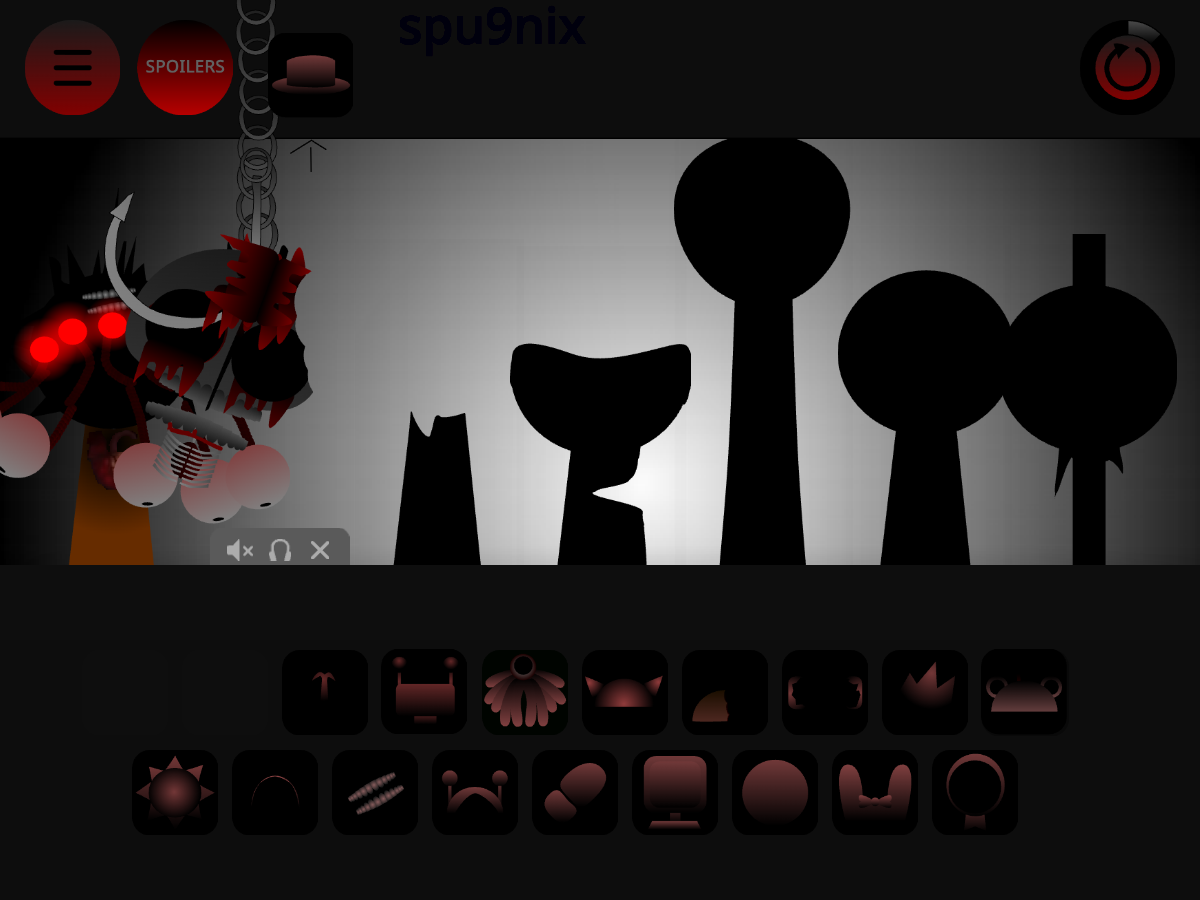
Sprunki Phase 8 is a character-based music mixer with a grey stage, dark waiting figures, and horror artwork that becomes visible as performers are assigned. The basic interaction is direct: move an icon from the tray onto a figure to give that position its associated part. Your arrangement takes shape through the characters on the stage, without requiring you to enter notes into a separate music editor.
The player on this page is the unsuffixed Sprunki Phase 8 build distributed by Miniplay. It should not be confused with a Definitive, Remastered, or other separately named revision. Matching phase numbers do not establish matching artwork or features. The instructions below follow the selected browser build and the interface shown in its screenshot, so you can compare what you see before trying a control.
Starting Sprunki Phase 8
Click Play Sprunki Phase 8 to replace the cover with the embedded game in the same position. The website requests the game only after that action. Give the player time to prepare its assets. This build includes an internal content warning before the main stage. Read the notice and use its visible continuation control when you are ready to proceed to the mixing screen.
The warning is relevant to the game's character designs. Although the initial figures are dark silhouettes, assigning icons can reveal disturbing faces and other horror details. The opening lineup should not be taken as a complete preview of the content. If you prefer a lighter presentation, return to All Games and choose another available title instead of proceeding through a warning you are uncomfortable with.
Sprunki Phase 8 Controls
The verified basic input is mouse dragging. Hold an available icon in the lower tray, move it over one of the stage figures, and release it over the body. A successful placement changes the figure's appearance. Try the body area if dropping near the head does not work. Watch the resulting character before adding another part so the response to each placement remains clear.
Seven stage positions are available in the observed mixing view. Beneath them, twenty icons are arranged in two rows. You do not need to fill the stage before exploring the interface. Start with one position, then add another icon to a different figure. This lets you connect the symbols in the tray with the performers they produce, instead of treating the lineup as an unexplained completed combination.
Recognizing the Sprunki Phase 8 Stage
The grey background makes the waiting silhouettes and activated performers easy to distinguish. Empty positions remain dark, while assigned characters introduce more detailed artwork. This contrast is useful feedback during placement. If a figure stays unchanged after a drag, check where you released the icon before assuming that the game has unlocked a new mode or started a separate event.
The upper toolbar includes a menu control, a SPOILERS label, a hat symbol, and a circular reset symbol. Those visible elements help identify this build when comparing it with screenshots elsewhere. Their presence does not prove an undocumented shortcut or secret combination. Use a control only according to the prompt it actually shows; a symbol alone is not evidence for a detailed claim about what it unlocks.
Making a First Sprunki Phase 8 Arrangement
Work with a small lineup before trying every icon. Add one performer, inspect the change, then add a second in another position. This is a practical way to learn the relationship between the selection tray and the stage. It also makes it easier to notice a failed placement. There is no need to memorize a character list before making the first arrangement.
The observed main screen is organized around combining character parts, rather than a visible race timer or numbered-level sequence. No verified score target is needed to begin. Choose the parts you want to explore and use the stage feedback to follow your selections. This page does not supply a supposedly winning combination, because the selected mixing screen does not establish one.
Sprunki Phase 8 and Other Phases
Phase 8 can be explored independently through its own player. Its number is a useful way to find the title, but it is not proof of a single official release order across fan projects. Different numbered uploads can use different artwork, menus, and assets. Compare the selected build itself when deciding what to play next, rather than expecting every control from another phase to transfer unchanged.
For another stage, the site's Phase 7 game remains on the homepage. All Games lists the additional stages that are actually available here. A Blog introduction can explain what to notice in a game, while a game page supplies its player and direct controls. You do not need to open an unrelated website or follow a download advertisement to move between those parts of this site.